Top 5 POS Hardware Must Haves for Restaurant
Picture this: a busy Friday night at your restaurant. Orders are flying in, customers are chatting, and the kitchen is humming. Suddenly, the POS system freezes, or the card reader fails to process a payment. Chaos. Lost sales. Frustrated guests. It’s a nightmare no restaurateur wants to face.
Having the right POS hardware isn’t just about technology-it’s about keeping your business running smoothly, your staff efficient, and your customers happy. Here’s a breakdown of the five essential POS hardware components every restaurant needs to thrive.
1. Touch-Screen POS Terminal / Customer-Facing Terminal
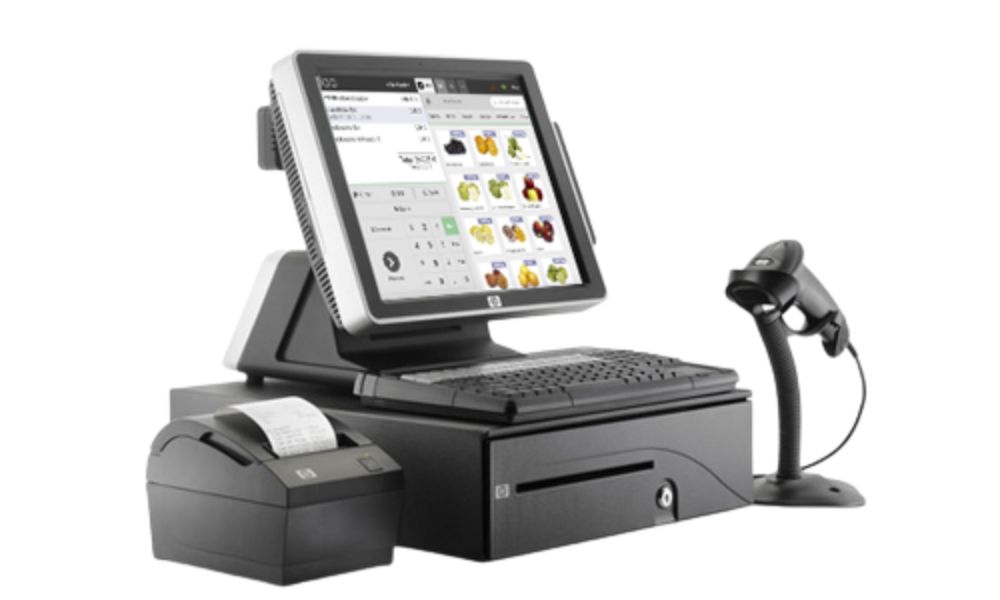
A restaurant’s workflow begins and ends at the main POS terminal. Grow POS offers bundles that include POS terminals (or terminal accessories) via their “POS & Hardware Combo Deals.”
Why this is a must-have:
- Staff can enter orders quickly and accurately, reducing manual errors.
- Supports multiple order types dine-in, takeaway, delivery — all from one interface, which Grow POS’s “POS Branch” module is designed for.
- Customer-facing displays or dual-stand setups help customers see what they ordered, improving transparency and trust. Grow POS lists dual-stand / adjustable-monitor-stand hardware among their sale items.
- Especially valuable during busy hours when speed matters.
2. Reliable Receipt / Order Printers & Kitchen Order Output
Even with digital systems, printers remain essential especially for receipt printing at the counter and order slips for kitchen or takeaway packaging. Grow POS indicates that their POS & hardware bundles can include the necessary hardware components for a full system, which likely includes printers.
Why you need printers:
- Quick and clean receipt generation for customers during checkout.
- Kitchen or bar staff get hard copy tickets — important for coordination when multiple orders stack up.
- Helps keep records for accounting, tax, and order traceability.
- Works as a fallback if digital displays or network fail, ensuring continuity.
3. Cash Drawer or Secure Cash Handling Hardware
Many restaurants still deal in cash or cash + card mix. Grow POS sells hardware bundles that include cash drawer–compatible hardware, enabling a full checkout setup.
Why cash hardware remains vital:
- Secure storage for cash transactions reduces risk of human error or loss.
- Supports mixed payment scenarios (cash + card), providing flexibility for customers.
- Integrated cash drawer + POS + printer combo speeds up checkout and keeps operations streamlined.
- Especially useful for restaurants that don’t rely exclusively on digital payments.
4. Customer-Facing / Kitchen Display or Dual-Monitor Stand Setup
Grow POS lists several hardware options such as adjustable monitor stands, dual-stand options (for iPad or tablet-based terminals) indicating support for dual-screen setups or customer-facing screens.
Why dual-screen / display hardware matters:
- Allows customers to view their order in real-time — better transparency and customer satisfaction.
- Useful for upselling: showing promotions, add-ons, or combo suggestions at checkout.
- Helps kitchen and front-of-house stay in sync when paired with order display screens or POS → kitchen communication.
- Cleaner, more modern look — elevates customer experience.
5. Modular / Customizable POS & Hardware Bundle (Flexibility for Your Restaurant’s Needs)
One of the biggest advantages of using Grow POS is its customizable “POS & Hardware Combo Deals.” You don’t get a one-size-fits-all — you can choose what hardware devices your restaurant needs (terminals, printers, stands, cash drawers, etc.) depending on your business model.
Why flexibility is crucial:
- Every restaurant is different a small cafe, a multi-branch chain, a takeaway shop, or a fine-dining restaurant will have different hardware needs.
- Enables scaling: start simple (one terminal, one printer), then expand (additional terminals, kitchen displays, extra stands) as business grows.
- Budget-friendly you don’t overspend on unnecessary hardware; you only get what you need.
- Easy upgrades or changes you can reconfigure hardware as your business evolves (e.g. add a delivery module, extra terminals, or digital menu boards).
Why Investing in the Right POS Hardware Matters
Choosing the right hardware, backed by a unified system like Grow POS — is not just about getting a cash register. It’s about building a backbone for efficient operations. Here’s what you gain:
- Speed & accuracy: Faster order entry, faster checkout, fewer errors.
- Customer satisfaction: Clean receipts, clear order displays/menus, professional look all improve customer experience.
- Scalability: As your restaurant grows, easy to expand hardware without changing systems.
- Flexibility: Support for dine-in, takeaway, online orders, delivery — all in one integrated ecosystem.
- Cost-effectiveness: Customizable bundles help you avoid unnecessary spending.
Grow POS doesn’t just offer software — by offering hardware bundles and integration, it’s trying to provide a full, reliable, plug-and-play solution for restaurants.
Final Thoughts
Don’t wait for a system failure to realize your POS hardware isn’t up to the task. Proactively upgrading and maintaining your POS setup ensures your restaurant runs like a well-oiled machine, even on the busiest nights.
Focus on durability, speed, integration, and security. These five hardware essentials cover the critical points of your restaurant’s sales process-from order entry to payment to kitchen communication.
With the right tools in place, your team can focus on what really matters: delivering great food and memorable experiences.

 March 27, 2026
 March 20, 2026
 March 15, 2026
 March 10, 2026
 February 27, 2026
 February 23, 2026