Touchscreen POS vs Traditional POS Systems: Which Is Better
Choosing the right point-of-sale (POS) system is more than a technical decision, it directly affects how quickly you serve customers, how efficiently your staff operates, and how much revenue your business generates. One of the most common questions business owners face today is whether to stick with a traditional POS system or upgrade to a touchscreen solution.
Both options have their place, but the best choice depends on your business type, workflow, and growth plans. In this guide, we’ll break down the key differences, advantages, and drawbacks of each system to help you make the right decision.
What Is a Traditional POS System?
A traditional POS system typically includes:
- A monitor (non-touch)
- Keyboard and mouse
- Barcode scanner
- Receipt printer
- Cash drawer
These systems rely on manual input through keyboards and are often found in older retail environments or businesses that haven’t yet modernised their operations.
What Is a Touchscreen POS System?
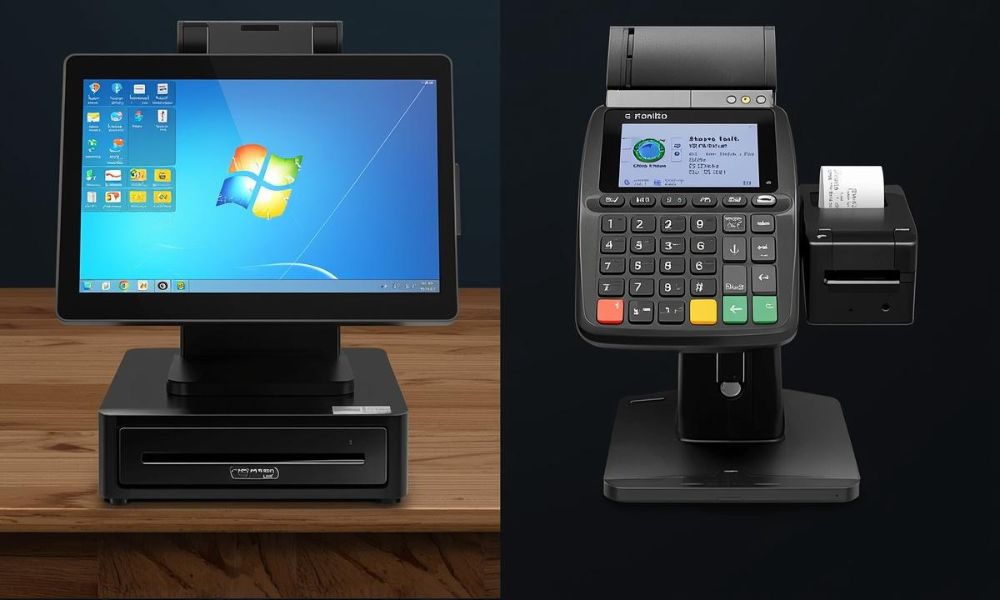
A touchscreen POS system replaces the keyboard and mouse with an interactive display. Staff can tap, swipe, and navigate directly on the screen, similar to using a smartphone or tablet.
Modern touchscreen POS setups often include:
- Sleek touch display
- Intuitive interface
- Faster navigation
- Integration with cloud-based software
They are now widely used in restaurants, cafés, retail stores, and self-service kiosks.
Key Differences Between Touchscreen and Traditional POS Systems
1. Speed and Efficiency
Touchscreen POS systems are significantly faster in real-world use. Staff can:
- Tap items directly on the screen
- Use visual menus instead of memorising codes
- Process transactions in fewer steps
In contrast, traditional POS systems require:
- Typing product codes
- Navigating menus with a mouse
- More manual input
👉 Result: Touchscreen systems reduce transaction time, which is critical during peak hours.
2. Ease of Use and Training
Training new staff is much easier with touchscreen systems.
- Touchscreen interfaces are visual and intuitive
- Staff can learn by interacting with icons and menus
- Minimal training time is required
Traditional systems often:
- Require memorising shortcuts or product codes
- Involve more complex navigation
- Take longer to learn
👉 Result: Touchscreen POS reduces onboarding time and human error.
3. Customer Experience
Customer experience plays a major role in repeat business.
Touchscreen POS systems improve experience by:
- Reducing wait times
- Enabling customer-facing displays
- Supporting self-service kiosks
Traditional POS systems:
- Are slower
- Feel outdated
- Offer limited interaction
👉 Result: Touchscreen systems create a smoother, more modern customer journey.
4. Space and Design
Touchscreen systems are designed with modern business environments in mind.
Touchscreen POS:
- Compact and sleek
- Reduces counter clutter
- Often includes all-in-one designs
Traditional POS:
- Bulky setup (keyboard + mouse)
- Requires more space
- Less visually appealing
👉 Result: Touchscreen systems are better for businesses with limited counter space.
5. Cost Comparison
Cost is often a deciding factor.
Traditional POS systems:
- Lower upfront cost
- Widely available
- Simple hardware
Touchscreen POS systems:
- Higher initial investment
- More advanced hardware
- Better long-term value
However, touchscreen systems often deliver:
- Faster service → more sales
- Lower training costs
- Reduced errors
👉 Result: Traditional POS may be cheaper upfront, but touchscreen POS often provides better ROI.
6. Durability and Maintenance
Durability depends on environment and usage.
Touchscreen POS monitors:
- Built with durable glass surfaces
- Resistant to spills and dust (in many models)
- Fewer moving parts
Traditional POS systems:
- Keyboards can wear out or break
- More components = more maintenance
- Susceptible to dirt and liquid damage
👉 Result: Modern touchscreen systems are often more durable and easier to maintain.
7. Flexibility and Integration
Modern businesses need systems that grow with them.
Touchscreen POS systems:
- Integrate easily with cloud software
- Support mobile and tablet POS
- Connect with inventory, CRM, and analytics tools
Traditional POS systems:
- Often limited to legacy software
- Harder to upgrade
- Less flexible
👉 Result: Touchscreen POS systems are more future-proof.
Pros and Cons Summary
a. Touchscreen POS Systems
Pros:
- Faster transactions
- Easy to use
- Modern design
- Better customer experience
- Scalable and flexible
Cons:
- Higher upfront cost
- May require staff adjustment (short-term)
b. Traditional POS Systems
Pros:
- Lower initial cost
- Familiar setup
- Simple functionality
Cons:
- Slower operation
- More training required
- Bulky hardware
- Limited scalability
Which POS System Is Best for Your Business?
a. Choose a Touchscreen POS If You:
- Run a restaurant, café, or retail store
- Want faster service and shorter queues
- Plan to scale or modernise your business
- Value customer experience and efficiency
b. Choose a Traditional POS If You:
- Have a very tight budget
- Operate a low-volume business
- Don’t need advanced features
- Prefer a basic, familiar setup
Industry-Specific Recommendations
a. Retail Stores
Touchscreen POS systems are ideal for fast checkout, promotions, and inventory integration.
b. Restaurants & Cafés
Touchscreens are essential for:
- Quick order entry
- Table management
- Reducing errors in busy kitchens
c. Service Businesses
Touchscreen systems simplify booking, billing, and customer management.
The Future of POS Systems
The trend is clear: businesses are rapidly moving toward touchscreen and cloud-based POS solutions.
With advancements in:
- AI-driven analytics
- Mobile payments
- Self-service kiosks
Touchscreen POS systems are becoming the standard, not the exception.
Traditional systems, while still functional, are gradually being phased out in favor of faster, smarter, and more user-friendly alternatives.
Final Verdict
While traditional POS systems may still work for some businesses, touchscreen POS systems offer clear advantages in speed, usability, and long-term value.
If your goal is to:
- Improve efficiency
- Enhance customer experience
- Increase sales
Then a touchscreen POS system is the better investment.
Ready to Upgrade Your POS System?
Investing in the right POS hardware can transform your daily operations and set your business up for long-term success. Touchscreen systems aren’t just a trend, they’re the future of modern commerce.

 March 27, 2026
 March 20, 2026
 March 15, 2026
 March 10, 2026
 February 27, 2026
 February 23, 2026