Essential POS Accessories Every Small Business Should Invest In
Suppose a busy retail store on a Saturday afternoon: customers lining up, sales flying through the register, and staff juggling multiple tasks. The last thing anyone wants is a slow checkout or a clunky system that holds everything up. That’s where the right POS accessories come into play. They’re the unsung heroes behind smooth transactions, happy customers, and efficient operations.
Why POS Accessories Matter More Than You Think
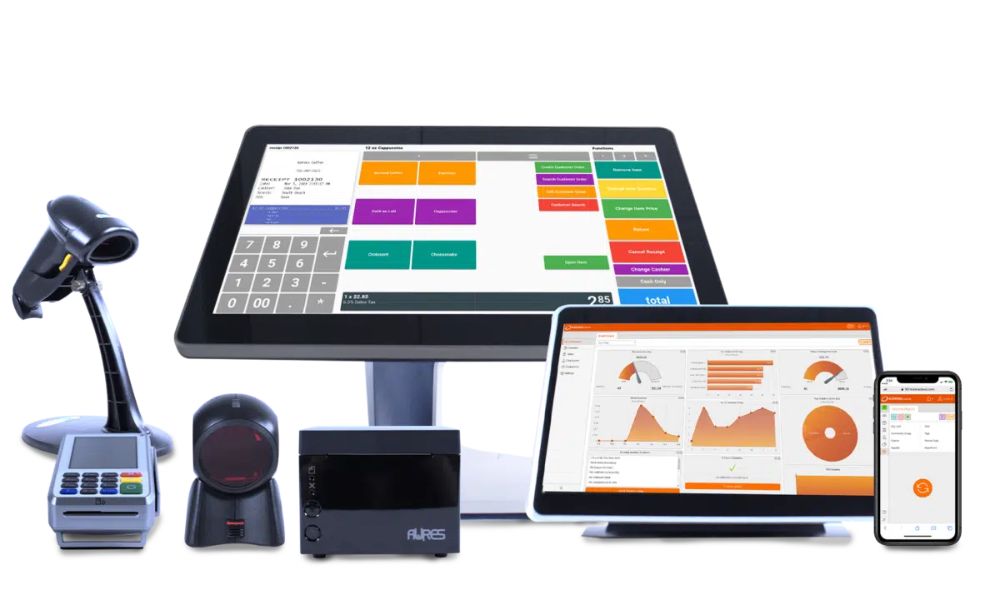
POS accessories play a crucial role in enhancing the overall efficiency and performance of your point-of-sale system. Items like barcode scanners, receipt printers, cash drawers, and customer displays may seem secondary, but they help streamline daily operations and reduce manual errors. Together, they make transactions faster, more accurate, and more convenient for both staff and customers.
Beyond functionality, the right POS accessories also improve the customer experience and brand image. A well-equipped checkout counter with modern accessories creates a professional impression and ensures smoother service during peak hours. Investing in quality POS accessories is not just about convenience—it’s about improving productivity, accuracy, and customer satisfaction.
Must-Have POS Accessories for Small Businesses
i. Receipt Printers: Fast and Reliable Printing
One of the most basic yet crucial accessories is the receipt printer. Customers expect a clear, legible receipt, whether it’s for returns, warranties, or just proof of purchase. A reliable receipt printer ensures transactions wrap up quickly without frustrating delays.
Thermal receipt printers are popular because they’re fast, quiet, and require no ink cartridges. They use heat to print on special paper, which keeps maintenance low. Investing in a high-quality printer means fewer paper jams and less downtime, which translates to happier customers and smoother operations. Additionally, many modern thermal printers come equipped with features like automatic cutting, which can further streamline the checkout process, allowing for a more efficient customer experience.
ii. Barcode Scanners: Speed Up Checkout and Reduce Errors
Barcode scanners are essential for any business that sells physical products. Manually entering product codes is slow and prone to mistakes. A scanner instantly reads barcodes, pulling up product information and prices in seconds.
There are various types of scanners—handheld, fixed-mount, wireless—each suited to different environments. For a small retail shop, a wireless handheld scanner offers flexibility and mobility. It lets staff quickly scan items anywhere on the floor, reducing bottlenecks at the register. Moreover, advanced models can even scan damaged or poorly printed barcodes, ensuring that you maintain efficiency even in challenging situations. This capability can significantly reduce the frustration of both customers and staff during busy hours.
iii. Cash Drawers: Secure and Organized Cash Handling
Even with the rise of digital payments, cash remains a staple for many small businesses. A sturdy cash drawer keeps bills and coins organized and secure. Many POS cash drawers connect directly to the receipt printer, opening automatically when a cash transaction is processed.
Look for drawers with compartments designed to separate different denominations, making it easier to give change quickly. Some models also come with locking mechanisms to enhance security, which is especially important in busy or high-traffic locations. Additionally, some cash drawers offer advanced features like cash management reports, helping business owners track cash flow and identify discrepancies, which can be invaluable for maintaining financial accuracy and accountability.
iv. Customer Displays: Keep Customers Informed
Customer-facing displays show transaction details in real time, building trust and transparency. When customers see prices and totals as items are scanned, it reduces confusion and disputes. These displays also provide an opportunity to promote specials or loyalty programs right at the checkout.
Small businesses benefit from simple, easy-to-read displays that integrate seamlessly with their POS system. Some models even support touch input, allowing customers to sign digitally or enter loyalty information. Furthermore, these displays can be programmed to showcase promotional content or advertisements, turning a simple transaction into a marketing opportunity that can drive additional sales and enhance customer engagement.
v. Payment Terminals: Accept Every Payment Type
Accepting a variety of payment methods is no longer optional—it’s expected. Payment terminals that support chip cards, contactless payments like Apple Pay and Google Pay, and even mobile wallets make transactions faster and more secure.
Choosing a payment terminal that integrates smoothly with your POS system reduces errors and speeds up processing times. Wireless terminals add flexibility, letting staff take payments anywhere in the store or restaurant, improving customer service. Additionally, many payment terminals now come with built-in fraud protection features, helping to safeguard both the business and its customers from potential security threats. This added layer of security not only enhances customer trust but also provides peace of mind for business owners navigating the complexities of modern payment processing.
Additional Accessories That Boost Efficiency
a. POS Stands and Mounts: Save Space and Improve Ergonomics
Counter space is precious, especially in small businesses. POS stands and mounts help organize hardware neatly, freeing up room for other essentials. They also position screens and devices at comfortable angles, reducing strain on employees during long shifts.
Adjustable stands can accommodate different setups and workflows, making it easier to customize the checkout area. A tidy, ergonomic space not only looks professional but also helps staff work more efficiently. Moreover, many modern POS mounts come with cable management features that keep cords out of sight, further enhancing the aesthetic appeal of the workspace. This not only minimizes distractions for employees but also creates a more inviting atmosphere for customers, who may appreciate a clean and organized checkout experience.
b. Label Printers: Perfect for Inventory and Pricing
For businesses that need to label products, shelves, or packages, a dedicated label printer is invaluable. It produces clear, durable labels quickly, helping keep inventory organized and prices visible.
Label printers come in various sizes and formats, from small handheld devices to desktop models. Investing in one that integrates with your POS software means you can print labels on demand, reducing errors and saving time. Additionally, many label printers support a variety of label types, including barcodes and QR codes, which can streamline inventory management and enhance customer engagement. By providing customers with scannable codes, businesses can offer quick access to product information or promotions, creating a more interactive shopping experience that encourages repeat visits.
c. UPS (Uninterruptible Power Supply): Protect Against Downtime
Power outages can bring your business to a halt. A UPS provides backup power to your POS system, allowing transactions to continue smoothly during short outages or power fluctuations.
Besides preventing lost sales, a UPS protects hardware from damage caused by sudden shutdowns. For small businesses, this investment safeguards both revenue and equipment, ensuring you’re always ready to serve customers. Furthermore, some UPS units come equipped with monitoring software that alerts you to power issues in real-time, allowing you to take proactive measures before they impact your operations. This level of preparedness can be a game-changer, especially during peak business hours when every second counts. By ensuring that your systems remain operational, you can maintain customer satisfaction and loyalty, even in the face of unexpected challenges.
Choosing the Right Accessories for Your Business
Not every business needs every accessory. The key is to assess your specific needs, transaction volume, and customer expectations. A small boutique might prioritize a sleek customer display and label printer, while a busy café could benefit more from wireless payment terminals and receipt printers.
Compatibility is another critical factor. Make sure the accessories you choose work seamlessly with your existing POS software and hardware. Many manufacturers offer bundles or packages designed to fit particular systems, which can simplify setup and support.
Finally, consider durability and support. Accessories that withstand daily wear and tear and come with good customer service will save headaches down the line.
Final Thoughts: Investing Smartly Pays Off
POS accessories might seem like small details, but they have a big impact on how smoothly your business runs. The right tools reduce errors, speed up checkout, enhance security, and improve the customer experience. For small businesses, these benefits translate directly into increased sales and happier customers.
Start by identifying the pain points in your current setup. Is checkout slow? Are cash transactions messy? Do customers ask for receipts or labels frequently? Then, choose accessories that address those issues without overcomplicating your system.
With smart investments in POS accessories, your business can operate more efficiently, look more professional, and keep customers coming back. It’s a small step that makes a big difference.

 March 27, 2026
 March 20, 2026
 March 15, 2026
 March 10, 2026
 February 27, 2026
 February 23, 2026