Guide to Choosing the Right POS Hardware for Your Business
Imagine a busy coffee shop during the morning rush. Customers line up, eager to grab their caffeine fix before heading to work. The barista’s hands move quickly, but the register is slow, clunky, and keeps freezing. Frustration builds on both sides of the counter. This scenario could be avoided with the right Point of Sale (POS) hardware.
Choosing the right POS hardware isn’t just about picking the latest gadget. It’s about finding a system that fits your business’s unique needs, streamlines operations, and enhances customer experience. Here’s a detailed guide to help you navigate the options and make a smart choice.
Understanding Your Business Needs
- Type of Business: Different industries require specific POS hardware — for example, restaurants need kitchen printers, while retail stores need barcode scanners.
- Transaction Volume: Choose hardware that can handle your daily sales volume efficiently without slowing down during busy hours.
- Business Size and Growth Plans: Select scalable POS hardware that can grow with your business and easily expand to new locations.
- Operating Environment: Pick hardware designed for your workspace, whether it’s a counter, food truck, or outdoor market.
- Mobility and Flexibility: Opt for mobile POS devices if your business serves customers on the move or outside a fixed counter.
- Integration with Existing Systems: Ensure the POS hardware connects smoothly with your accounting, inventory, and other business tools.
- Payment Methods Supported: Choose devices that accept multiple payment options like cards, mobile wallets, and contactless payments.
- Budget and Total Cost of Ownership: Consider both the initial cost and long-term maintenance expenses when selecting POS hardware.
- User-Friendliness: Pick easy-to-use hardware to minimize staff training time and reduce operational errors.
- Customer Experience: The right POS hardware ensures faster checkouts and a smoother, more satisfying customer experience.
Key Components of POS Hardware
1. POS Terminals
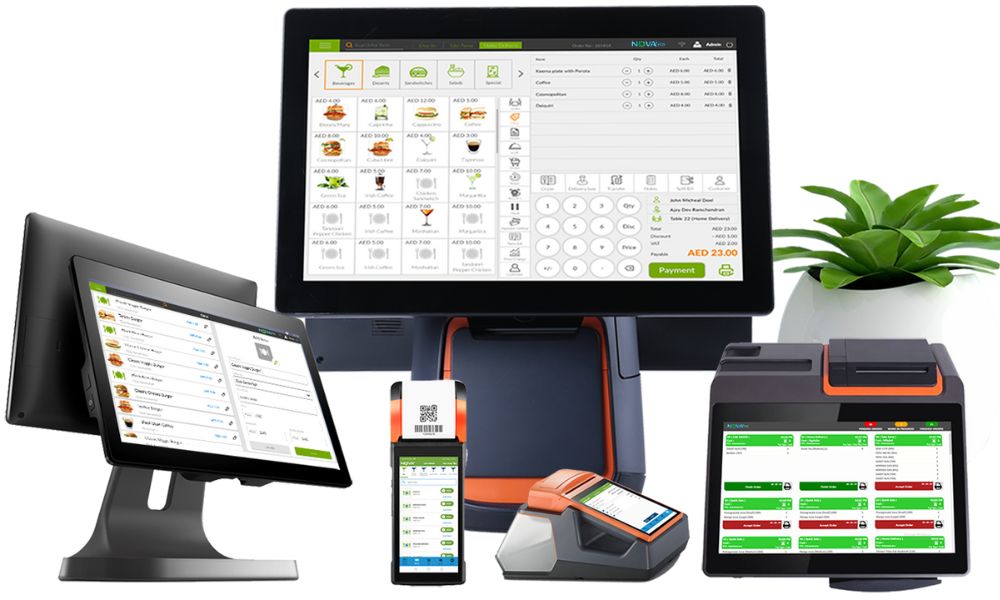
The terminal is the heart of your POS system. It’s the device where transactions are processed, and it can range from a traditional desktop computer to a sleek tablet. Desktop terminals are powerful and can handle complex software but tend to be less mobile. Tablets offer flexibility and portability but might require additional peripherals for full functionality.
Additionally, many modern POS terminals come equipped with user-friendly interfaces that simplify the transaction process, allowing staff to complete sales quickly and efficiently. Some systems even integrate with cloud-based software, enabling real-time data access and analytics, which can significantly enhance decision-making for business owners.
2. Receipt Printers
Receipts are essential for both customers and record-keeping. Thermal printers are the most common choice because they are fast, quiet, and require less maintenance. Some businesses might also want printers that can handle barcode or label printing to streamline inventory management.
Furthermore, advanced receipt printers can offer customizable receipt formats, allowing businesses to include promotional messages or branding elements, enhancing customer engagement. The ability to print receipts in various formats, such as digital or email receipts, also caters to the growing preference for eco-friendly practices among consumers.
3. Cash Drawers
Even in a largely cashless society, many businesses still handle cash transactions. A sturdy cash drawer that connects to your POS terminal ensures secure cash management. Look for drawers with features like adjustable compartments and robust locking mechanisms.
Additionally, some cash drawers come equipped with smart technology that can track cash flow and alert management to discrepancies, providing an extra layer of security. This capability is particularly beneficial for businesses that deal with high volumes of cash, as it helps to minimize the risk of theft and errors during cash handling.
4. Barcode Scanners
For retail businesses, barcode scanners speed up checkout and reduce errors. Handheld scanners offer flexibility, while fixed scanners can speed up processing at busy counters. Some scanners can also read QR codes, which is useful for modern payment methods and promotions.
Moreover, advanced barcode scanners can integrate with inventory management systems, automatically updating stock levels as items are sold. This real-time inventory tracking not only helps prevent stockouts but also provides valuable insights into sales trends, enabling businesses to optimize their product offerings and inventory levels.
5. Payment Terminals
These devices handle credit and debit card transactions. Modern payment terminals support chip cards, contactless payments like Apple Pay or Google Wallet, and even NFC-enabled devices. Ensure your terminal supports the payment types your customers prefer.
Additionally, some payment terminals come with built-in security features such as encryption and tokenization, which protect sensitive customer data during transactions. This is increasingly important in today’s digital landscape, where data breaches can have severe repercussions for businesses. By investing in secure payment terminals, businesses can not only enhance customer trust but also comply with industry regulations regarding data protection.
Factors to Consider When Selecting POS Hardware
1. Durability and Build Quality
POS hardware is a daily workhorse. It needs to withstand spills, drops, and constant use. Look for devices designed for commercial use rather than consumer-grade products. Ruggedized hardware might cost more upfront but can save money in the long run by reducing downtime and repair costs.
2. Ease of Use
Your staff will interact with the POS hardware constantly. Choose systems with intuitive interfaces and minimal setup complexity. The easier it is to use, the less training time you’ll need, and the fewer mistakes will happen during busy periods.
3. Scalability
Think about your business’s future. Will you open more locations or expand your product line? Select POS hardware that can grow with you. Modular systems that allow adding peripherals or terminals are ideal for businesses planning to scale.
4. Connectivity Options
Reliable connectivity is crucial. Wired Ethernet connections tend to be more stable, but Wi-Fi offers flexibility. Some businesses might benefit from Bluetooth peripherals or cellular backup options to keep transactions flowing during internet outages.
5. Budget Constraints
While it’s tempting to go for the most advanced system, budget matters. Balance cost with features and durability. Sometimes spending a bit more upfront saves money later by avoiding frequent replacements or upgrades.
Popular POS Hardware Solutions for Different Business Types
1. Retail Stores
Retail businesses often need a combination of barcode scanners, receipt printers, and cash drawers. A desktop terminal or all-in-one POS system works well here. Look for hardware that supports inventory management and integrates with e-commerce platforms if you sell online.
2. Restaurants and Cafes
Speed and accuracy are critical in food service. Touchscreen terminals with kitchen display system (KDS) integration can streamline order processing. Portable tablets for tableside ordering and payment can enhance customer experience. Thermal receipt printers and cash drawers remain essential components.
3. Mobile and Pop-Up Businesses
Portability is king. Lightweight tablets or smartphones paired with compact card readers offer flexibility. Battery life and wireless connectivity are important since these businesses often operate without fixed power or internet connections.
4. Salons and Service Providers
These businesses benefit from POS hardware that integrates appointment scheduling and customer management. Tablets or compact terminals with card readers are common. Receipt printers might be optional depending on the service model.
Tips for Purchasing and Maintaining POS Hardware
- Research Before Buying: Compare different POS hardware brands and models to find the best fit for your business type and size.
- Check Compatibility: Ensure the hardware is fully compatible with your POS software and other business systems.
- Prioritize Quality: Invest in durable and reliable hardware instead of choosing cheaper, low-quality options.
- Consider Future Needs: Choose scalable hardware that can grow with your business as you expand.
- Read Reviews and Testimonials: Look for feedback from other businesses to understand real-world performance and reliability.
- Get Professional Installation: Have your POS system set up by a qualified technician to avoid configuration errors.
- Train Your Staff: Provide proper training so employees know how to use and care for the hardware effectively.
- Perform Regular Maintenance: Clean and inspect devices regularly to prevent dust buildup and technical issues.
- Update Software and Firmware: Keep all systems updated to ensure security, compatibility, and optimal performance.
- Have Backup Equipment: Keep spare essential components like printers or card readers to avoid downtime.
- Monitor Performance: Regularly check for any lags, connection issues, or errors to address them early.
- Use Manufacturer Support: Take advantage of warranties, service contracts, and technical support when needed.
Conclusion
Choosing the right POS hardware is a critical decision that impacts every aspect of your business, from customer satisfaction to operational efficiency. By carefully assessing your needs, understanding the components, and considering factors like durability and scalability, you can invest in a system that supports your business today and grows with you tomorrow.
Remember, the best POS hardware isn’t necessarily the most expensive or the flashiest. It’s the one that fits your business like a glove, making transactions seamless and helping you focus on what matters most-serving your customers.

 March 27, 2026
 March 20, 2026
 March 15, 2026
 March 10, 2026
 February 27, 2026
 February 23, 2026